
Included in every package
The SendIQ Unibox
Every reply from every mailbox and LinkedIn, in one place
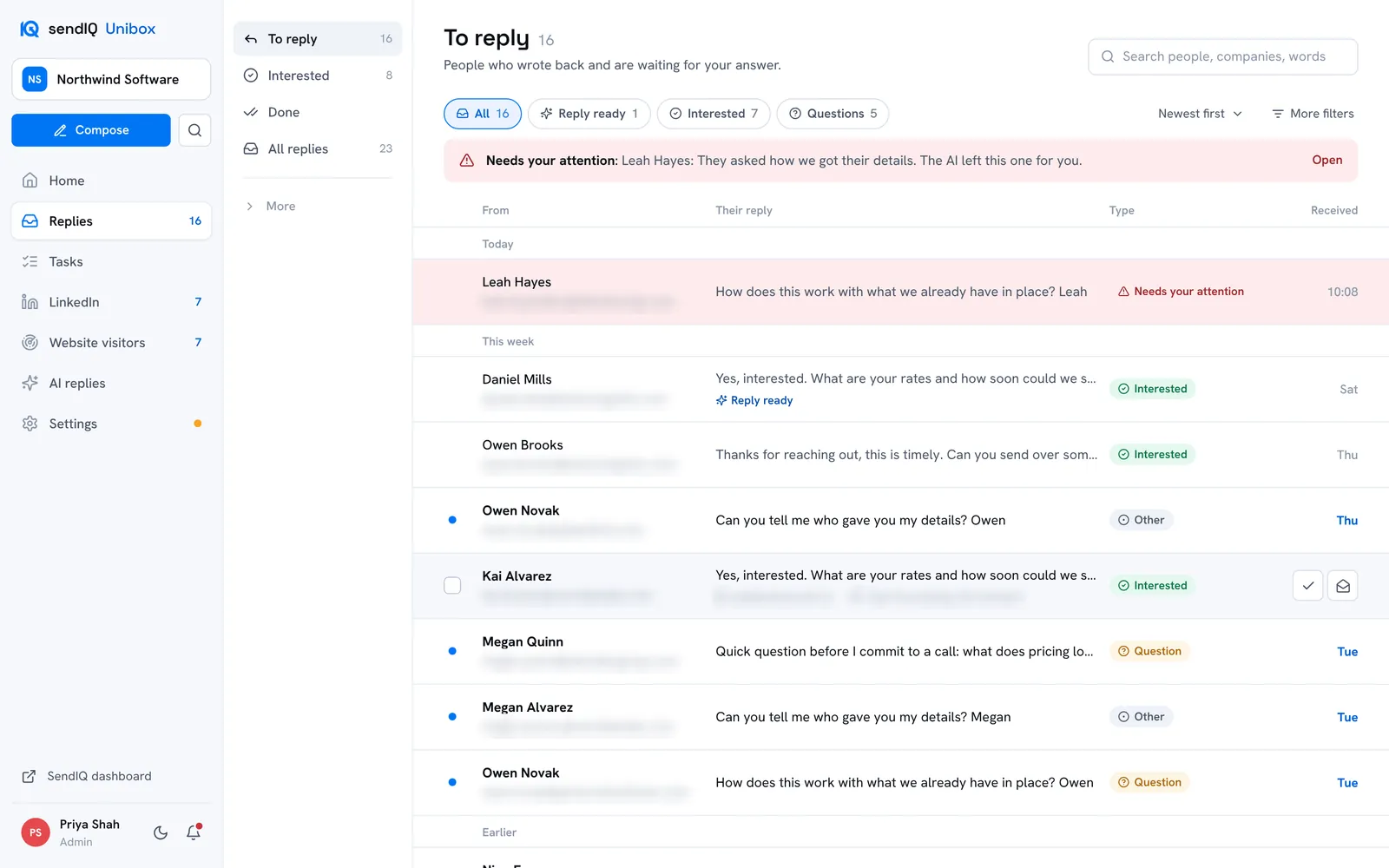
The SendIQ Unibox brings every reply to your outreach into one inbox. It filters out the noise, labels each reply and can answer email replies with AI, as drafts for you to check or automatically, so your team can see and answer everyone who wrote back from one place.
- Replies from email and LinkedIn in one inbox
- AI email answers, drafted or automatic, per mailbox
- Included in every package
Replies belong in one place
Short answer
A SendIQ campaign sends from more than one mailbox, and replies on LinkedIn arrive somewhere else again. The SendIQ Unibox gathers all of them into one list of the people who actually wrote back, so nobody on your side has to check mailbox by mailbox.
A warm reply is worth most while the person is still thinking about it. When every reply sits in one list, sorted and labelled, your team can see who is waiting and answer them while the conversation is fresh.
The Unibox is part of the managed service. SendIQ sets up and runs the outreach; the replies come to you, and you handle them. See how the managed service works.
From a reply to your answer
Short answer
The SendIQ Unibox picks up each reply, removes what is not a reply, labels it, and puts it in front of you. For email replies, its AI can draft an answer for you to approve or send one automatically, depending on the mailbox’s AI mode.
Your campaign goes out
SendIQ runs your outreach by email and LinkedIn. This page covers what happens to the replies; for the whole process, see how SendIQ works.
Replies are collected
Every mailbox your campaign sends from is checked around the clock, and new replies usually appear in the Unibox within about 30 seconds.
The noise is removed
Warm up mail, automated reports and unrelated mail are filtered out, so the list holds replies to your outreach.
Each reply is labelled
Interested, question, not interested, out of office and other labels are added, and for email replies the AI prepares an answer, unless the mailbox’s AI mode is off.
The answer goes out
In draft mode, you send the draft, change it or write your own; in automatic mode, the AI’s answer to an email reply is sent without waiting for you. An email answer you send goes out from the mailbox the prospect wrote to, threaded under their message, with your signature. When you answer a LinkedIn reply, your answer is sent through your connected LinkedIn profile.
What you see, and what you don’t
Short answer
The SendIQ Unibox shows mail that belongs to a conversation your outreach started, whether it came from your cold email outreach or from LinkedIn. Everything else is kept out of your view automatically, so the list is the people who wrote back.
Shown
- A reply to one of your outreach emails
- A new email from someone the campaign already contacted
- A reply sent on LinkedIn by someone the campaign contacted
Filtered out
- Warm up mail
- Automated reports and notifications
- Newsletters and cold pitches from strangers
Four folders instead of many mailboxes
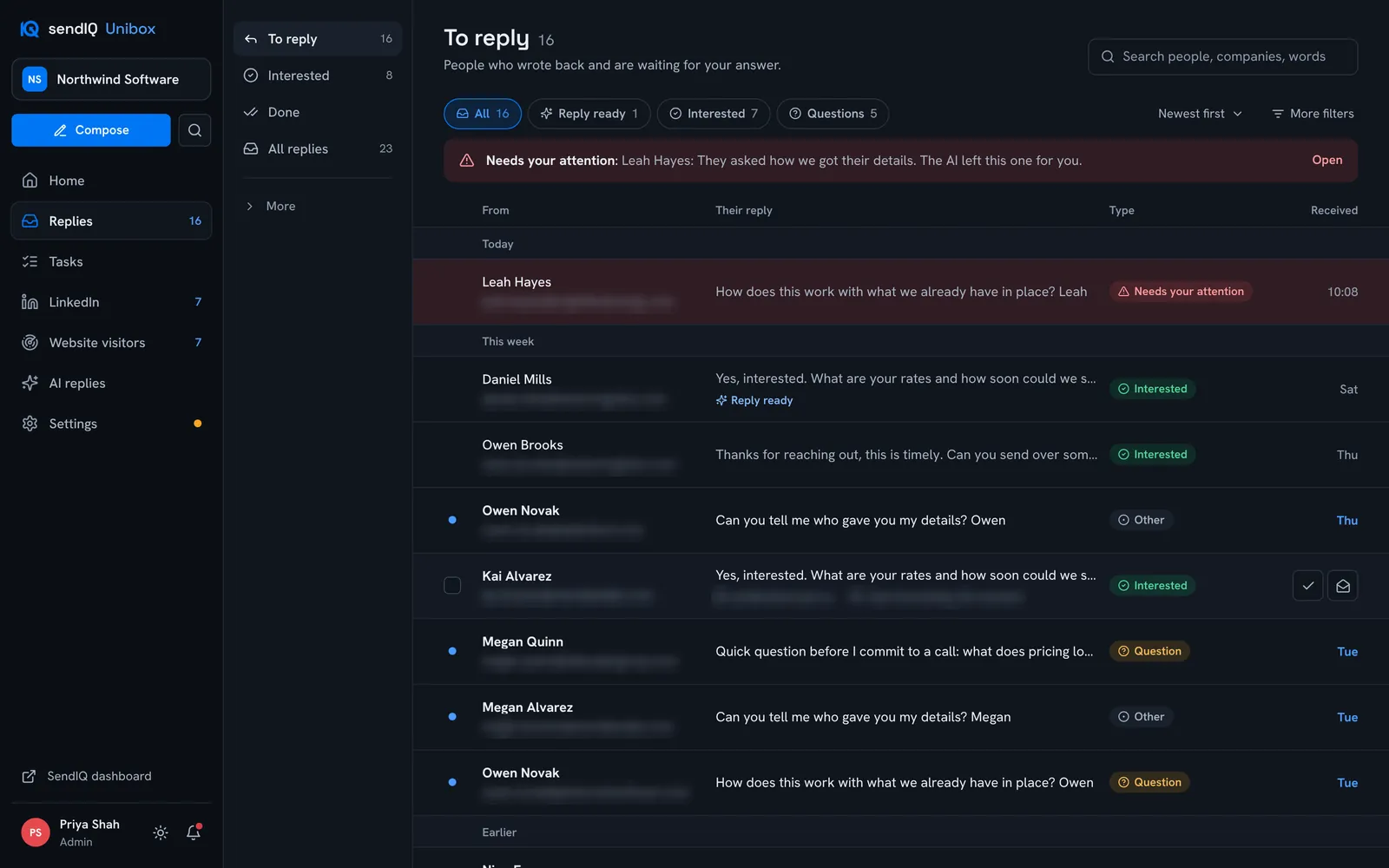
Replies sit in four folders: To reply, Interested, Done and All replies. New replies stand out, anything urgent is highlighted in red at the top, and filters narrow the list to replies with a draft ready, interested replies or questions.
Search everything
People, companies and words, across every mailbox and campaign at once.
Work as a team
Assign conversations, leave private team notes and see who is replying.
Keyboard friendly
Move, reply and mark done without the mouse.
AI answers, set for each mailbox
Short answer
For email replies, the SendIQ Unibox’s AI reads each reply, labels it and writes an answer using your own notes, offer and tone. Each mailbox has an AI mode: off, draft or automatic. SendIQ sets the default for each mailbox and you can change it. In draft mode, a person reviews each answer and can send it, ask for it shorter, friendlier or more formal, change it or write their own; in automatic mode, the answer is sent without waiting for a person.
- Labels each email reply: interested, question, referral, not interested, out of office, unsubscribe and more
- Writes from your notes, your offer and your tone
- Three AI modes for each mailbox: off, draft for approval, or automatic
- Set to leave sensitive or unanswerable replies for a person, and flag them
- Once a prospect replies, they receive no further stages of the outreach
- A request to stop blocks every further message to that person, automatic answers included
When a person is needed
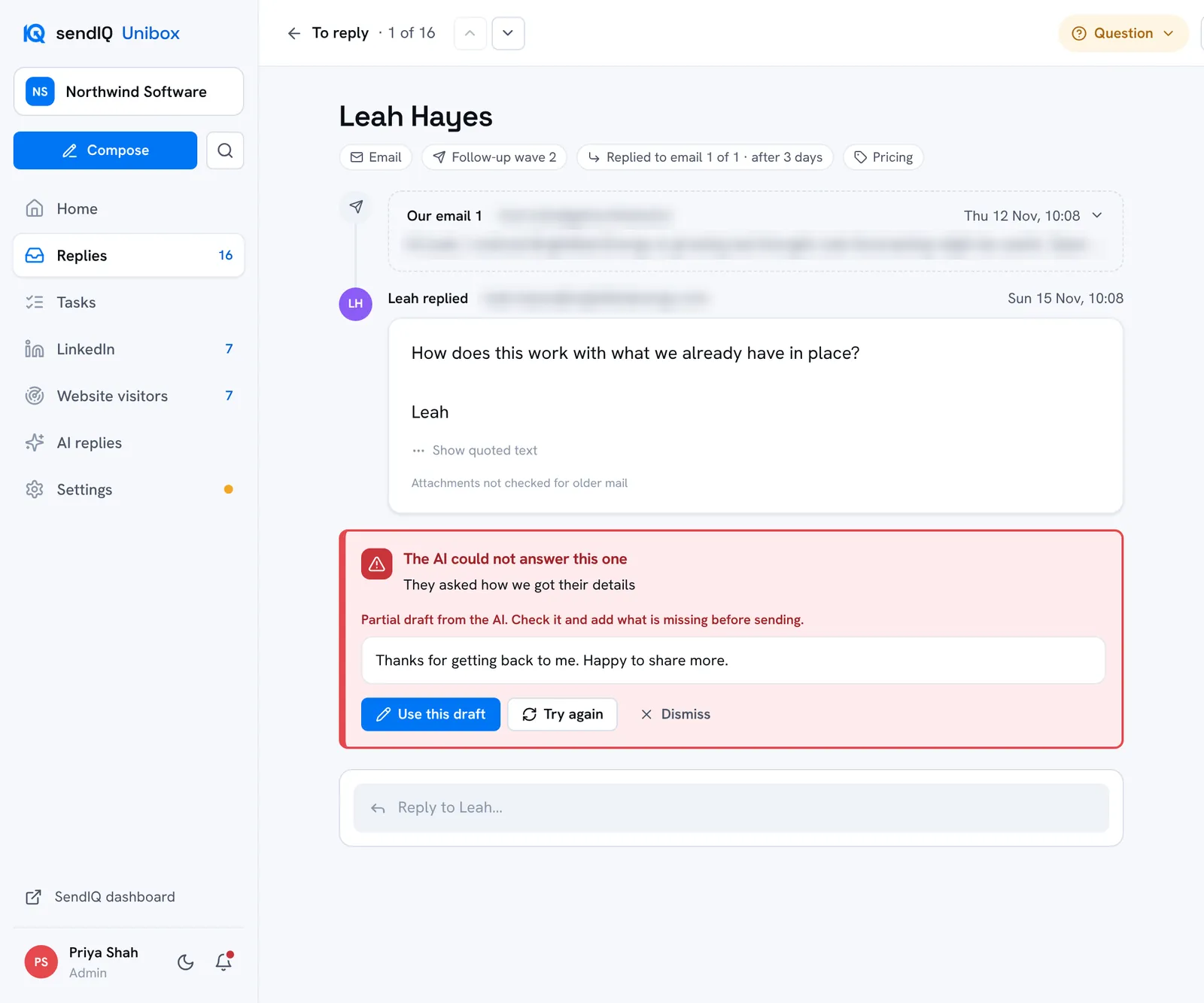
If a prospect asks something your notes do not cover, or something sensitive such as how their details were found, the AI is set to leave it for a person rather than answer. The conversation is flagged “Needs your attention” at the top of the inbox and a notification goes out. Any partial draft is offered as a starting point for you to finish.
Website visitors, LinkedIn replies and tasks, in the same place
Short answer
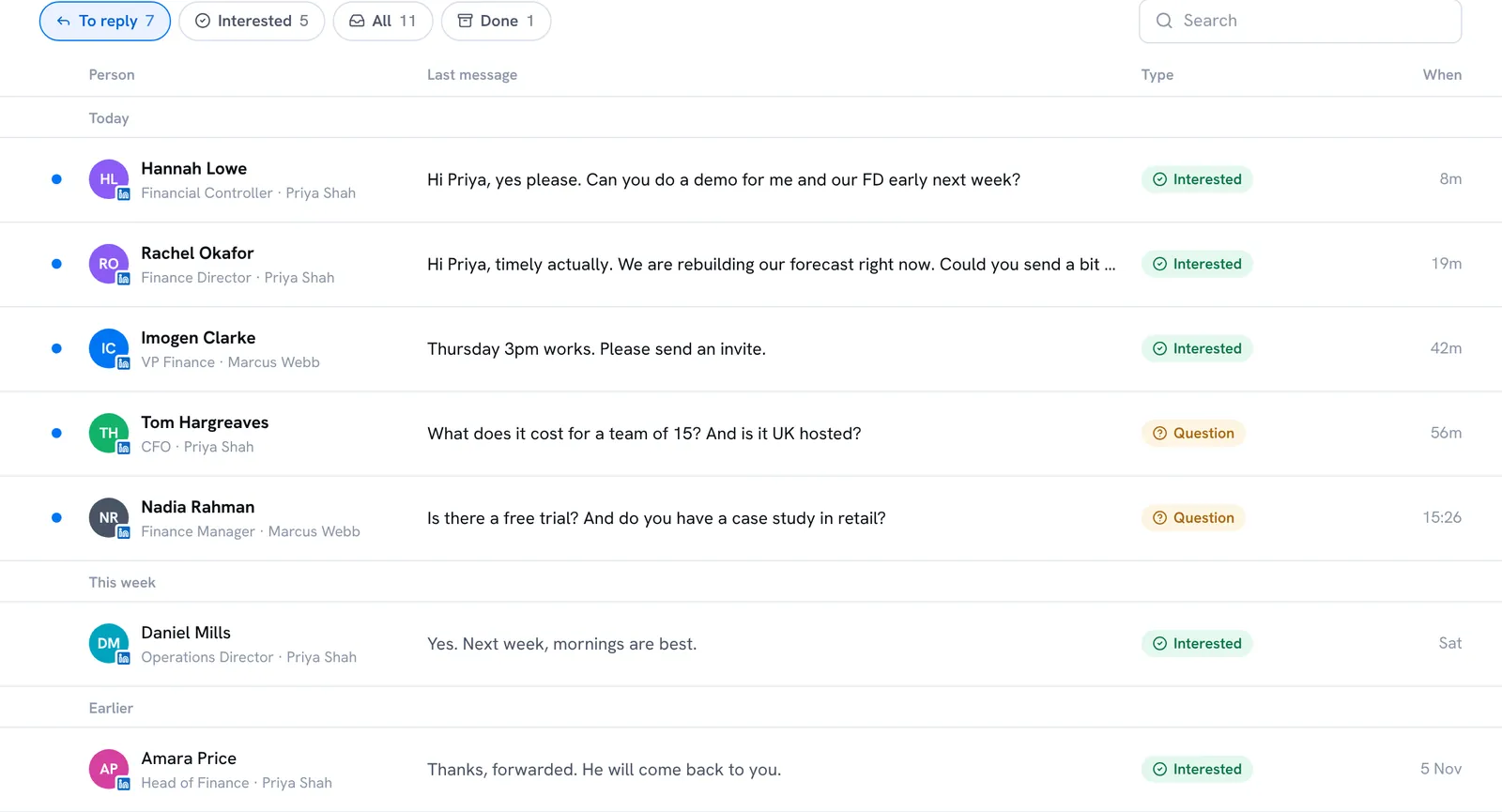
The SendIQ Unibox also shows the companies visiting your website, replies sent on LinkedIn and your follow up tasks, so the work that comes out of a campaign sits in one place.
Website visitors
Companies browsing your website appear in the Unibox, matched against your outreach: not contacted, in outreach, or already replied. Visits are shown at company level, not as named individuals. The tracker runs on your own website, and you will usually need your visitors’ consent before it runs. If a company is not yet in your outreach, you can ask SendIQ to approach it. More on website visitor identification.
Replies sent on LinkedIn
Replies to your LinkedIn outreach arrive in your Unibox too, alongside the email replies, and you can answer them from there. The answer is sent through your connected LinkedIn profile.
Tasks
Follow ups are typed in plain English, such as “Call Kai tomorrow at 3pm”, linked to the conversation they belong to, with a reminder on the day.
The numbers that matter, on one screen
Short answer
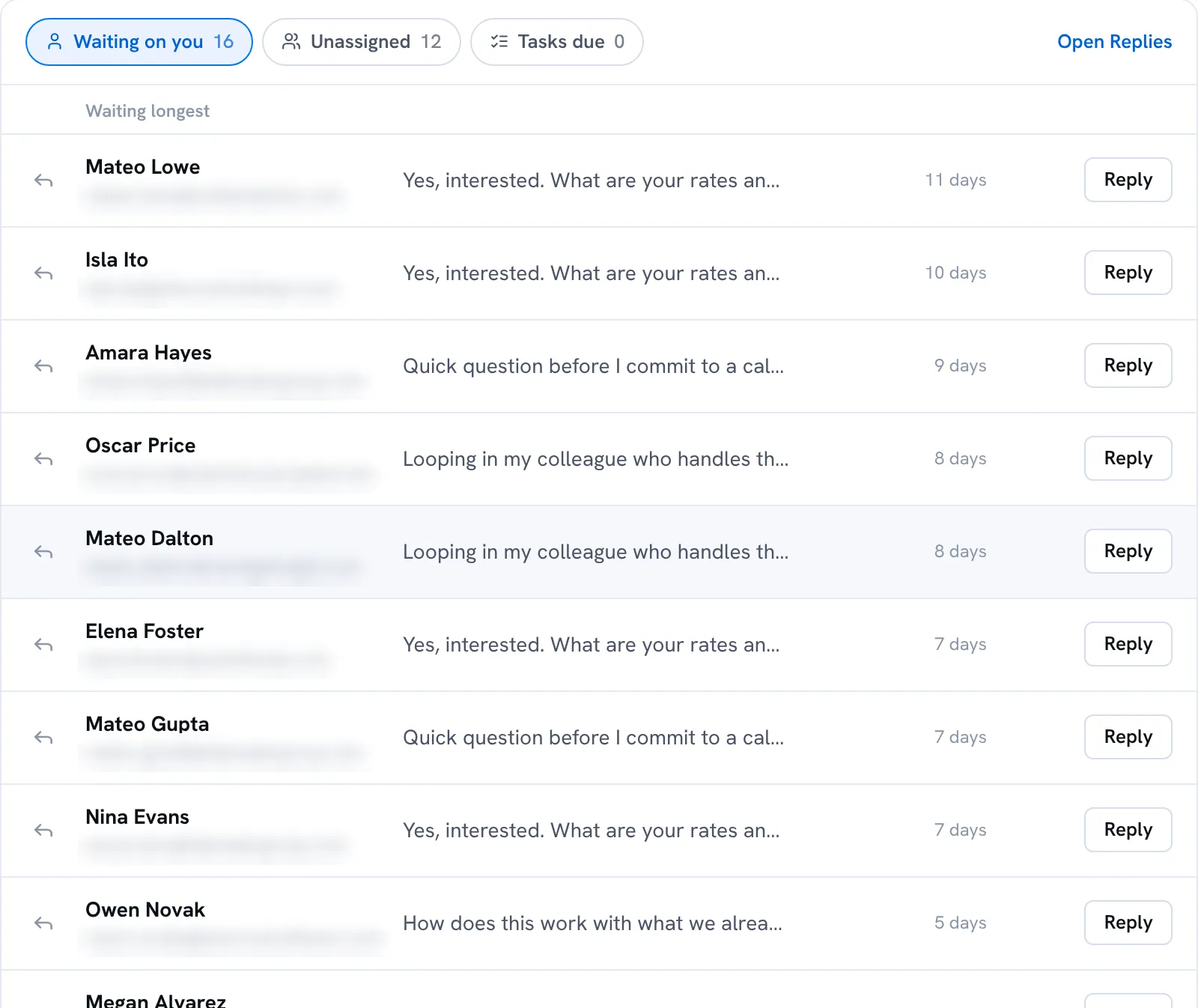
The SendIQ Unibox home screen shows replies this week, interested replies and meetings you have marked as booked, with the people who have waited longest for an answer at the top.
Each reply can be marked interested, meeting booked or done in one click, and reply outcomes can be downloaded for your own reporting. SendIQ’s own reporting is separate: replies and opportunities are counted, and meetings are counted separately where the campaign tracks them.
On your phone, when you are away from your desk
Short answer
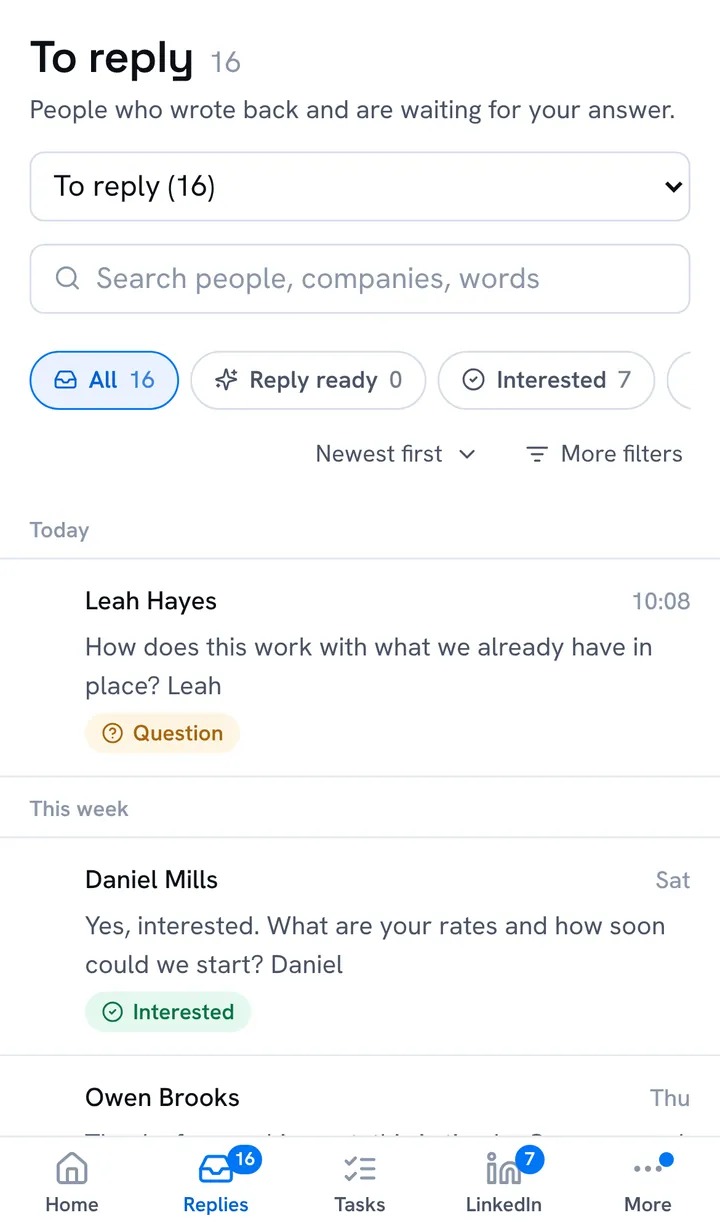
The SendIQ Unibox installs to your phone’s home screen like an app, with notifications for new and urgent replies where your phone supports them, so a warm reply reaches you, and can be answered, away from your desk.
It has large touch targets and a full screen composer for writing replies, and works in light and dark modes.
Built for client data
Short answer
Each SendIQ client has its own login to the Unibox, scoped to its own replies. The SendIQ team can also access your Unibox to run the service. Your team can be given different roles, and sensitive actions are recorded. How SendIQ handles personal data is set out in the privacy policy.
- A separate, scoped login for each client
- Admin, member and viewer roles, so people can read without sending
- Optional two step sign in
- Mailbox passwords and attachments encrypted at rest
- Sensitive actions recorded in an audit log
Included in every package
Short answer
The SendIQ Unibox is not sold on its own. Unibox access is included in every SendIQ package, from £1,499 a month ex VAT, on a 4 month initial partnership (1 setup month plus 3 active).
The package also includes the database build, the campaign creation, the infrastructure setup, dashboard access, LinkedIn outreach slots, website visitor identification, intent data and ongoing support. See what is included in the price.
Frequently asked questions
Still have a question?
Book a 45-minute discovery call, or request a callback and we will call you.
Is the SendIQ Unibox sold separately?
No. The SendIQ Unibox is included in every SendIQ package, from £1,499 a month ex VAT on a 4 month initial partnership, alongside the database build, campaign creation and the rest of the managed service. It is the inbox where the replies to your campaign arrive. See what is included in the price.
Who answers the replies, SendIQ or me?
Mainly you. Replies come into your Unibox, and you handle them. You can answer yourself, and for email replies the Unibox’s AI can answer as drafts for you to approve or automatically, in the mode set for each mailbox. The SendIQ team can also access your Unibox and send in a conversation to run the service. SendIQ sets up and runs the outreach that produces the replies.
Does the AI write to my prospects?
It can, for email replies, in the mode set for each mailbox. In draft mode, the AI writes a suggested answer from your notes, offer and tone, and a person sends it, changes it or writes their own. In automatic mode, the AI’s answer is sent without waiting for a person. SendIQ sets each mailbox’s mode and you can change it, so to check every answer before it goes, set the mailbox to draft. When a reply asks something your notes do not cover, the AI is set to leave it for a person and flag it “Needs your attention”.
Do replies sent on LinkedIn come into the Unibox?
Yes. Replies sent on LinkedIn by people your campaign contacted arrive in your Unibox, next to the email replies, and you can answer them from the Unibox. The answer is sent through your connected LinkedIn profile.
What happens if someone asks to stop?
Once a prospect replies, they receive no further stages of the outreach, so if they ask to stop, the outreach stops. A request to stop also puts the person on SendIQ’s do not email list and blocks every further message to them, automatic answers included. The Unibox labels an unsubscribe request so you can see it.
Can my whole team use it?
Yes. Your team members can each have a login with a role: admins manage settings and people, members reply and take tasks, and viewers can read without sending. Conversations can be assigned and private team notes added.
Can I use the Unibox on my phone?
Yes. The SendIQ Unibox installs to your phone’s home screen like an app and sends notifications for new and urgent replies where your phone supports them.
See the Unibox on a discovery call
The discovery call is 45 minutes long. It covers what SendIQ does, how it operates, how it could help your business and whether it is the right match, and you see the SendIQ Unibox on the call.